COMPOSITION BEFORE CROPPING
Give every word room to stay.
New posters start with an 8×10 portrait layout (4:5). Keep names, faces, essential details and every word in the green safe area. Only background reaches the crop edges.
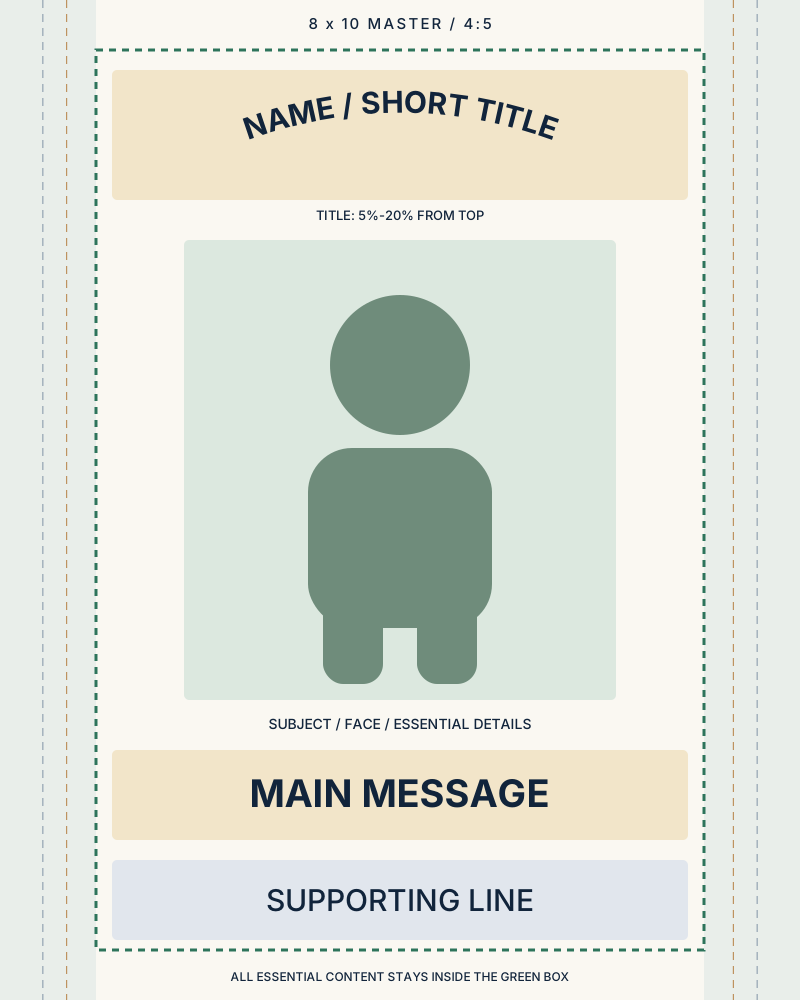
Placement template only. Preview is not a guarantee of printer trim or image detail.
Download the vector placement templatePlace the essentials here
Top 5–20%: short title or arched name.
Middle 22–72%: subject, face and essential details.
Bottom 74–84%: main message.
Bottom 86–94%: supporting line.
The shared safe box spans 12–88% of the master width and 5–95% of its height. Reflow long wording and reduce subject scale when needed. Review every final crop.
Pixels and paper are separate
| Size | Pixels at 300 PPI |
|---|---|
| 4×6 | 1200×1800 |
| 5×7 | 1500×2100 |
| 8×10 | 2400×3000 |
| 11×14 | 3300×4200 |
| 16×20 | 4800×6000 |
These are pixel targets, not a claim that every file supports every size. Actual pixels, source detail and the final crop must be checked. Changing a DPI tag or enlarging an image does not create original detail.
When you print
Choose the exact paper size. Use Fit / Entire image to retain all edges; borders can be expected. Fill / Crop removes edges. Borderless auto-expansion can also crop; check the preview and your printer’s settings.
Older 2:3 posters lose 16.7% of their height when filled into 8×10. Use Fit to preserve their top and bottom wording.